

Solving Camera Blind Spots in a Leesburg Townhouse Layout

To fix townhouse camera blind spots, we check what each lens can see before choosing a mounting point. Narrow walkways, recessed entries and deep rear decks can hide ground-floor doors while putting neighboring stoops in view. Mounting a wide-angle camera directly above a door won't solve that if an overhang or privacy divider blocks the shot.
Before running permanent power lines, we map the camera's viewing area at each entry. That means checking where people approach and where packages land. The aim is useful footage when an alert arrives, without false alarms or views across your neighbors' privacy boundaries.
What's Inside This Guide
- Mapping Narrow Elevations and Exterior Sightlines
- Five Steps to Audit Property Angles and Overhangs
- Matching Ring Systems to Townhouse Entry Points
- Network Backhaul and Power Line Considerations
- Project Phases, Electrical Runs, and Timelines
- Townhouse Security Questions and Practical Answers
- Book Professional Smart Security Installation in Sterling
Mapping Narrow Elevations and Exterior Sightlines
Townhomes put several stories on a narrow footprint, which makes camera placement less straightforward than it looks. A standard camera mounted flat against siding may record mostly vinyl partitions or neighboring windows instead of the walkway below. Checking the lens angle helps catch gaps behind porch columns where someone could pass without being recorded.
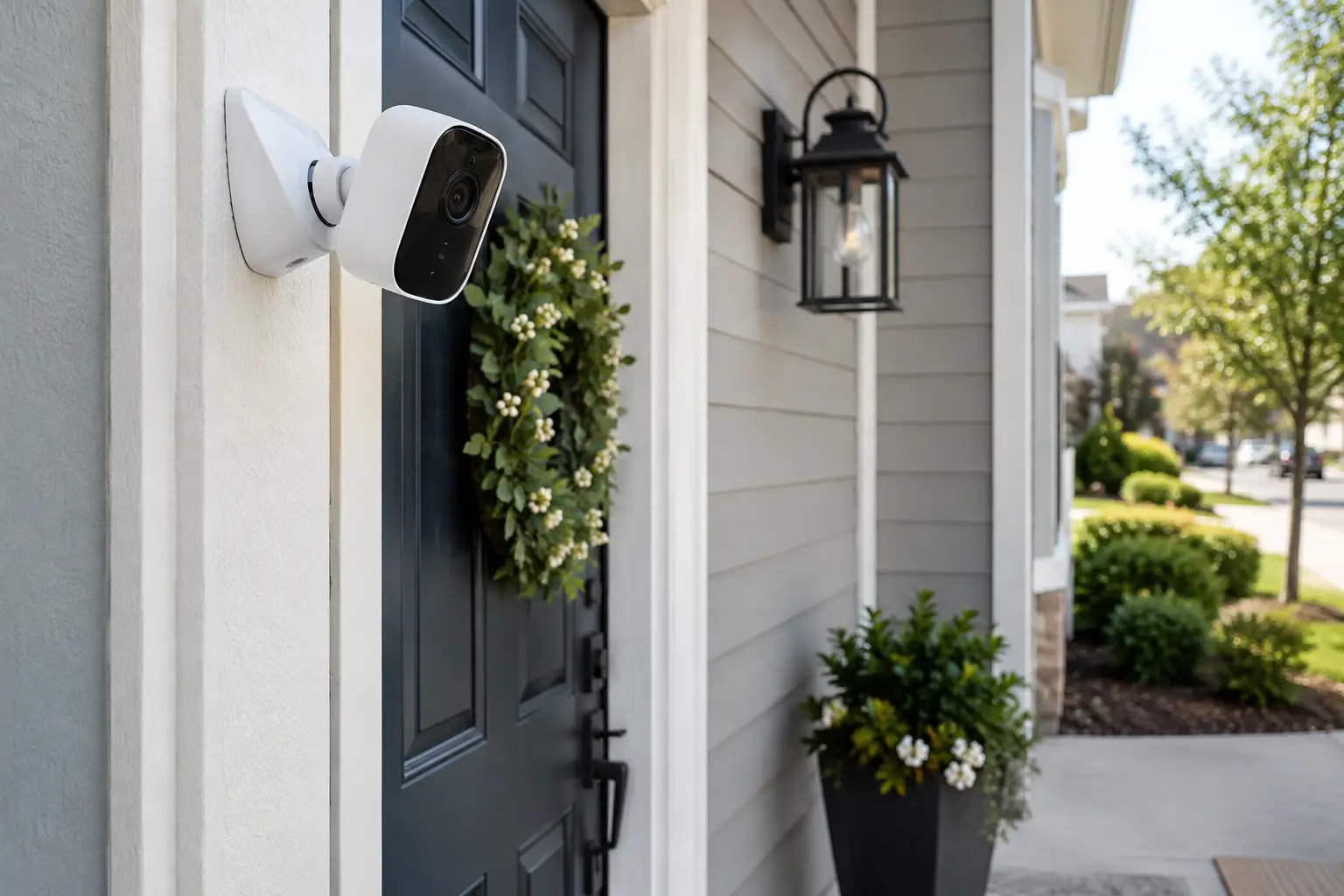
Installer's rule: Keep camera mounts at least fourteen inches from exterior corners so infrared night vision doesn't reflect off nearby gutters and wash out the recording.
Managing Recessed Front Steps and Porch Overhangs
Entries beneath second-story overhangs get harsh backlight on sunny afternoons and deep shadows at dusk. Without an angled wedge, a doorbell camera may show a visitor's chest but miss packages below the threshold. We check the downward viewing angle to keep deliveries visible without picking up every person on the shared sidewalk.
Balancing Rear Deck Elevations with Lower Walkouts
An upper-deck camera can leave the basement walkout below it completely out of view. Pointing a camera down from a high soffit, the underside of the roof edge, creates another problem. Its motion detection area may spread too thin, so recording starts late as someone approaches the lower sliding doors.
Five Steps to Audit Property Angles and Overhangs
Check the view on site before drilling into brick veneer or hardboard trim. Our guide to finding the right outdoor camera placement explains how positioning affects coverage around your home.
Video: Is the eyfyCam S4 good for reducing blind spots? (Tu Pl)
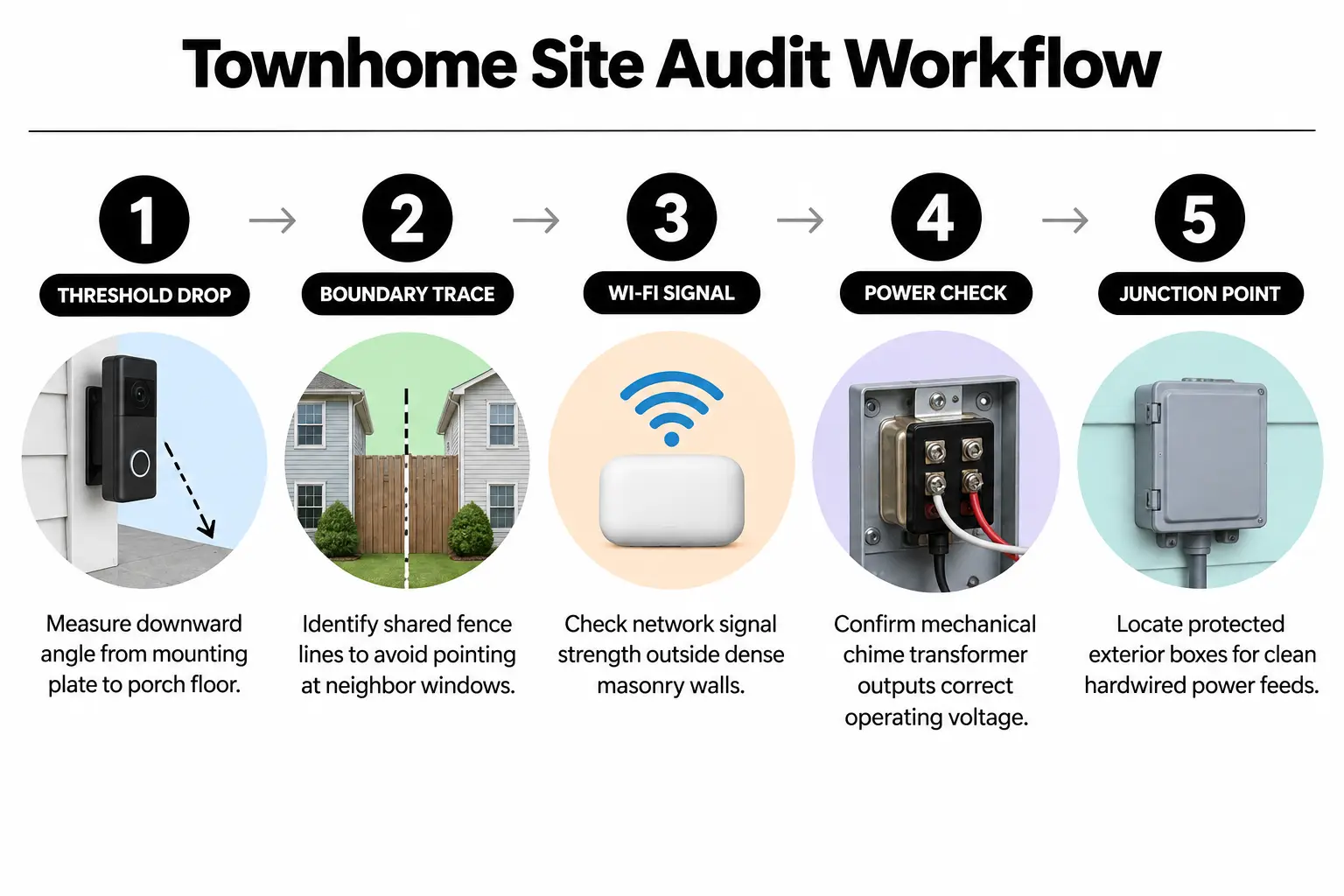
- Measure the drop from the threshold: Stand at the front door and measure down to the bottom landing. Check whether a downward tilt wedge is needed to see packages against the wall.
- Trace shared boundary fences: Walk the rear perimeter and establish where your patio ends and your neighbor's property begins. Keep lenses pointed away from private living areas.
- Check Wi-Fi signal loss: Measure RSSI, the strength of the received wireless signal, through masonry walls. Phone diagnostics or a network analyzer help check whether live video will stay reliable.
- Inspect transformer voltage: Test the mechanical chime wiring with a digital multimeter. Confirm that it supplies the required 16 to 24 volts AC while powering the device.
- Locate protected connection points: Find weather-sealed soffits or existing exterior light fixtures that can provide a continuous 120V power supply for floodlight cameras.
Selecting Wireless Versus Hardwired Camera Runs
Battery-powered cameras work for balconies with little traffic, but busy driveways and main entries need hardwired power. A continuous supply lets pre-roll buffers, which save footage from before an event, work properly. That gives you the visitor's approach rather than a clip of their back as they leave.
Matching Ring Systems to Townhouse Entry Points
The camera's viewing angle and power supply have to fit the space available. For a closer look at cable routing and the work involved, read our comparison of DIY and professional Ring installation in Arcola.
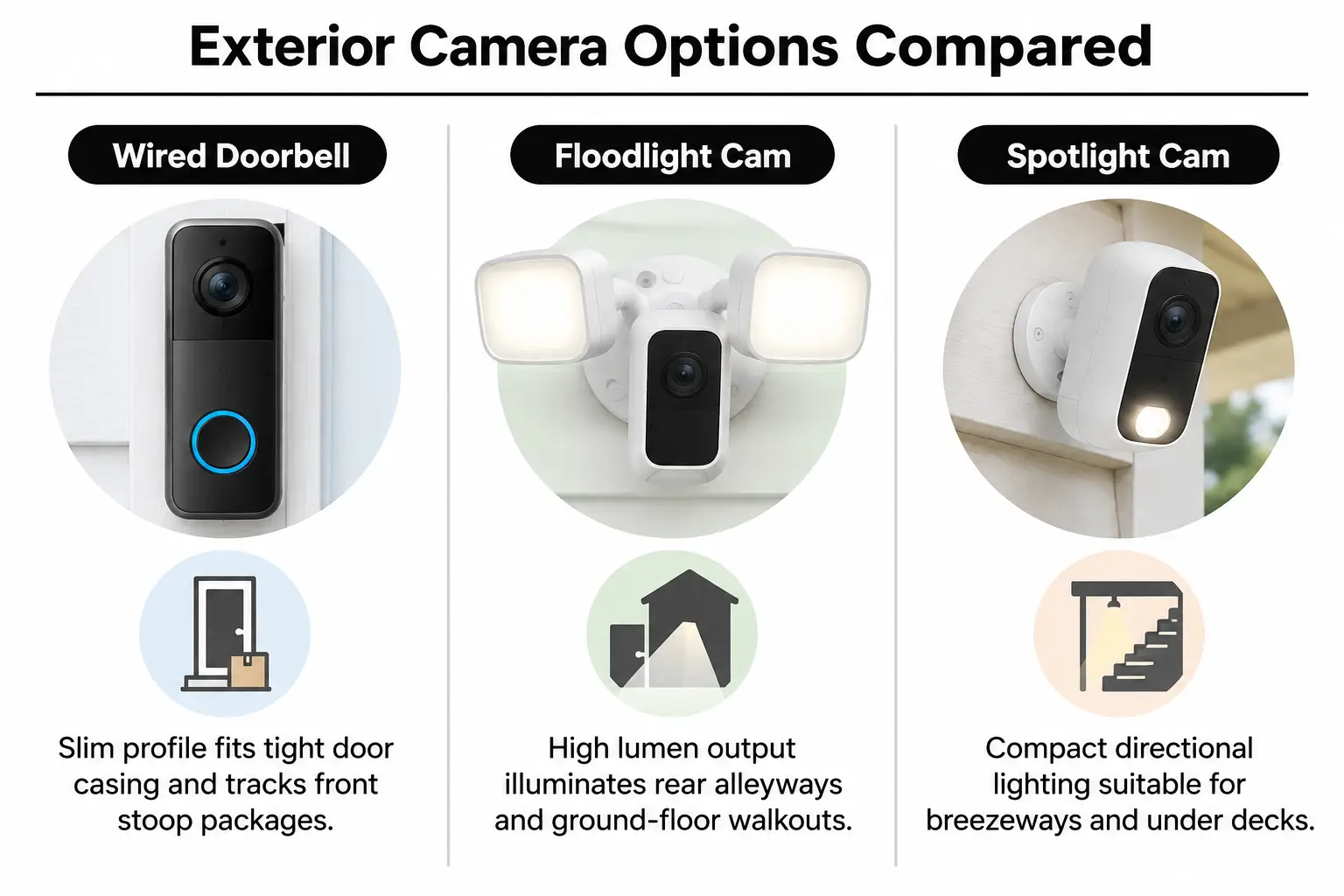
Hardwired Video Doorbells for Front Entries
Narrow door jambs often don't have room for a standard mounting bracket. A slim doorbell with a corner wedge turns the lens toward the path. It also removes the blind corner beside the exterior brick moulding, the trim around the door.
Wired Floodlight Cams for Rear Garages and Basements
Tandem rear garages and under-deck walkouts need broad lighting alongside motion detection. High-output floodlight cameras fit existing round exterior junction boxes. They light dark alleyways and remove pockets of shadow where someone could hide.
Low-Profile Spotlight Cameras for Breezeways
Compact spotlight cameras suit covered side passages and corridors beneath decks. Their focused coverage provides clear color night vision without shining bright light through shared privacy fences into neighboring spaces.
| Device Option | Best For | Watch Out For |
|---|---|---|
| Ring Wired Doorbell Pro | Recessed front porches and townhouse steps | Needs 16V-24V transformer output to prevent power drops |
| Ring Floodlight Cam Wired Plus | Rear basement walkouts and shared alley driveways | Requires a dedicated electrical box and 120V supply |
| Ring Spotlight Cam Plus (Hardwired) | Under-deck patios and narrow side breezeways | Soffit must be deep enough for the junction bracket |
| Ring Stick Up Cam Elite (PoE) | Multi-story brick walls with heavy radio interference | Requires Ethernet cables through interior walls for power and data |
Network Backhaul and Power Line Considerations
Reliable cameras need a steady wireless signal as well as steady power. For a local Ring camera installation, shared townhouse firewalls deserve a close check. Double-layer drywall and dense insulation weaken the signal, as does concrete in shared walls. Both 2.4 GHz and 5 GHz Wi-Fi bands are affected.
Our guide to Wi-Fi strength for 4K security cameras explains how to check whether your network can handle high-resolution video.
Practical check: Don't set motion zones until the network signal tests below -65 dBm RSSI, the received signal reading, or live view will stall when motion triggers recording.
Eliminating Ghost Alerts Across Adjoining Decks
Decks just inches apart can produce dozens of daily alerts as neighbors use their own steps. Adjusting the detection area saves battery life and avoids making everyday activity next door a nuisance. Our instructions for setting privacy zones on Ring and Nest cameras explain how to draw those boundaries.
- Custom motion zones: Draw the detection boundary inside your deck floorboards so shared stair traffic stays outside it.
- Notification schedules: Reduce chime frequency during busy morning commute hours so alerts don't become something you ignore.
- Privacy masks: Block portions of the camera feed that show adjoining balconies to respect neighbor privacy, as recommended in federal consumer privacy guidance.
Well-set alerts keep your phone from buzzing constantly without giving up useful security coverage. For help with app settings, see our notes on common Google Home and Ring notification mistakes.
Project Phases, Electrical Runs, and Timelines
Doing the work in order avoids costly drywall repairs and helps every device communicate with its base station. Changes to electrical panels or wiring need particular care. Consult the national electrical code requirements or hire a licensed professional.
| Project Phase | What Happens | Who Handles It | Typical Timing |
|---|---|---|---|
| Perimeter check | Find blind spots, test Wi-Fi and inspect the transformer | Homeowner or technician | 30 to 45 minutes |
| Initial electrical work | Run low-voltage lines and mount exterior junction boxes | Electrician or professional installer | 1 to 3 hours |
| Hardware mounting | Secure doorbells, spotlight cameras and wedge brackets | Professional installer | 45 to 60 minutes |
| Software and privacy settings | Connect devices, update software and set privacy boundaries | Professional installer | 30 minutes |
Power cuts can leave a smart home without protection, so backup batteries need to be part of the plan. Read about what happens to smart security during an outage before deciding how to keep your system running.
For a single-day hardware and setup visit, see how we install your Ring doorbell, camera and alarm in one appointment. Still deciding where to buy the equipment? Our guide covers buying and installing Ring security on the same day in Leesburg.
Townhouse Security Questions and Practical Answers
Can I angle a doorbell camera away from my neighbor's door?
Yes, modular corner wedges turn the camera 15 to 45 degrees away from adjoining walls. Pairing a wedge with privacy masks in the app keeps adjacent doors out of your recorded footage.
Will townhome vinyl siding support heavier floodlight cameras?
Vinyl siding needs mounting blocks that fasten through the siding into structural wall studs. Attaching a heavy fixture directly to hollow vinyl lets it sag and can loosen weatherproof seals over time.
How do I power cameras under a rear walkout deck with no outlet?
Installers can run weather-rated low-voltage wiring or extend an existing exterior light circuit through conduit, a protective tube, along deck joists. Either approach provides continuous power without exposed extension cords or repeated battery changes.
What internet upload speed do three HD exterior cameras require?
Three outdoor HD cameras need a sustained upload speed of at least 6 to 9 Mbps. Check the federal broadband speed guide to see whether your internet plan supports several video streams at once.
Do doorbell cameras record effectively through storm doors?
Storm door glass reflects the camera's infrared lights at night, causing glare that blinds the sensor. Mount the camera on the exterior brick moulding or outer door casing instead, where the glass won't block its view.
Book Professional Smart Security Installation in Sterling
At NovaProHome, we check camera positions and cable routes along with your network settings. As an official Ring Authorized Partner, we bring genuine Ring hardware to your Sterling home at standard retail pricing. Mounting, wiring and configuration happen in the same visit.
Founded by an electrical engineer, our team backs every installation with $2M in insurance coverage. To schedule your security setup, get in touch with NovaProHome.
Ready to engineer your smart home?
Start with a free 20-minute discovery call. No pressure, no sales script — just a plan.