

Fairfax VA Automated Home Systems: Eliminating Multi-App Clutter
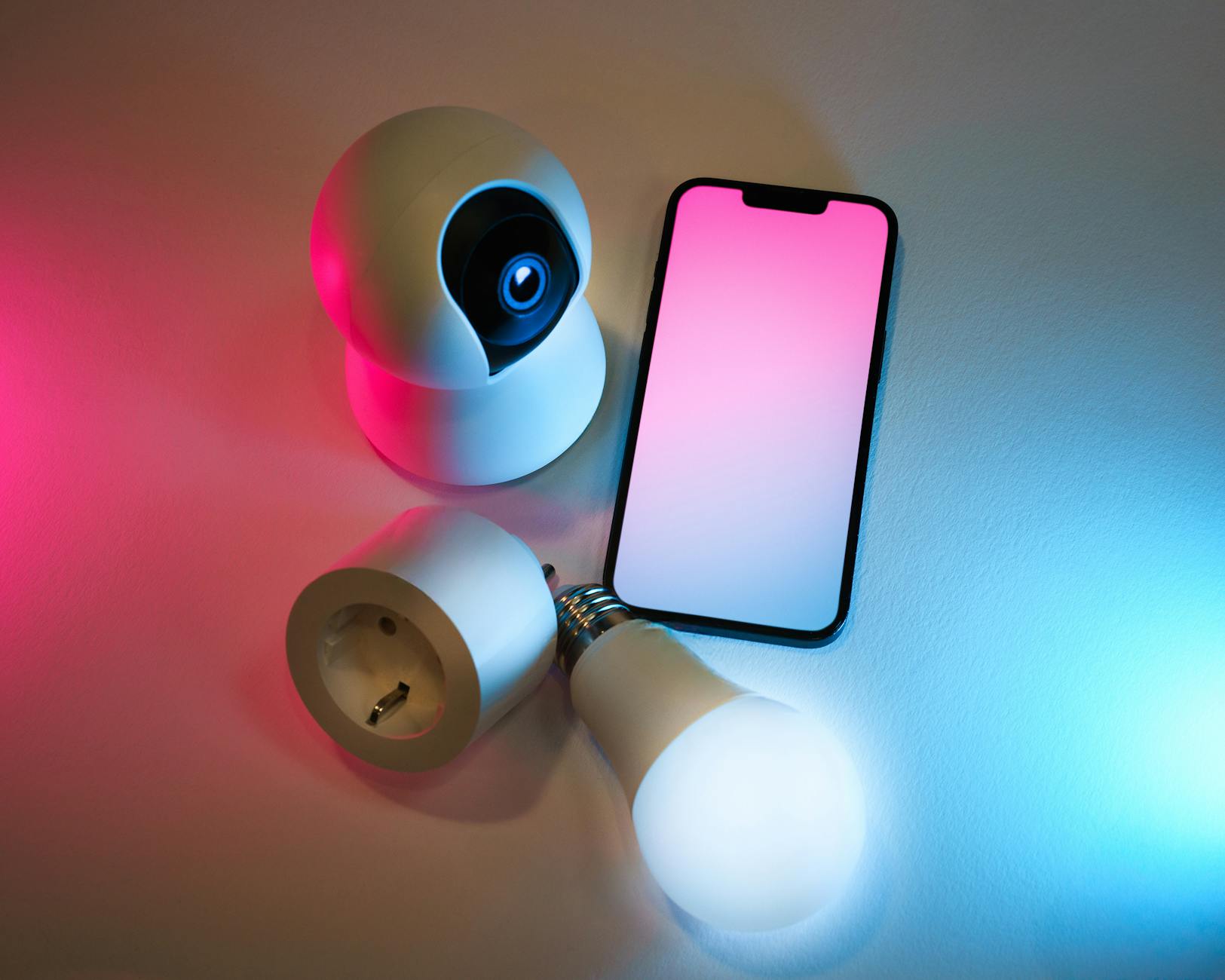
Full home automation brings separate smart devices under one local controller, so you can use one app instead of several. A typical Northern Virginia household runs six to twelve apps for climate controls, locks, and garage lights. Our guide to automation for seniors in Virginia covers how connected controls can help at home.
Heating and cooling schedules can fail when sensors cannot share information, quietly adding to your bills. Dedicated automation hardware helps stop unnecessary heating cycles as outdoor temperatures change. For a local example, see our separate post about our home automation work in Stone Ridge.
What's Inside This Guide
- System Efficiency by the Numbers
- Unified Control Metrics: Single App Architecture
- Field Data on Integrated Hardware
- Integration Failures That Drain Residential Budgets
- Investment Factors and Wiring Variables
- Operational Realities vs Common Assumptions
- Multi-App Setups Compared to Engineered Unified Systems
- Technical Answers for Fairfax System Planning
- Plan Your Unified System Architecture
System Efficiency by the Numbers
- Shared controls: Connecting smart devices through one local controller reduces radio traffic across 2.4 GHz network bands by up to 60 percent.
- Extra heating cycles: Heating units with separate timers cycle 15 to 25 percent more often than systems using shared occupancy sensors.
- Too many accounts: Homeowners manage an average of 8 software accounts when they buy off-the-shelf smart devices without a system plan.
- Managing power demand: Coordinated electrical controls prevent circuit spikes by scheduling power-hungry appliances outside periods of peak grid demand.
Unified Control Metrics: Single App Architecture
Separate apps take time to manage and can hide wasted energy. Without a connection to motorized blinds or ceiling fans, a thermostat works harder to offset heat from sunlight. We regularly see this problem when homeowners ask about monthly smart home power use during peak heating and cooling seasons.
Video: Inside the Ultimate Lutron HomeWorks QSX Lighting System – Luxury Home Automation Tour (Boston Automations)
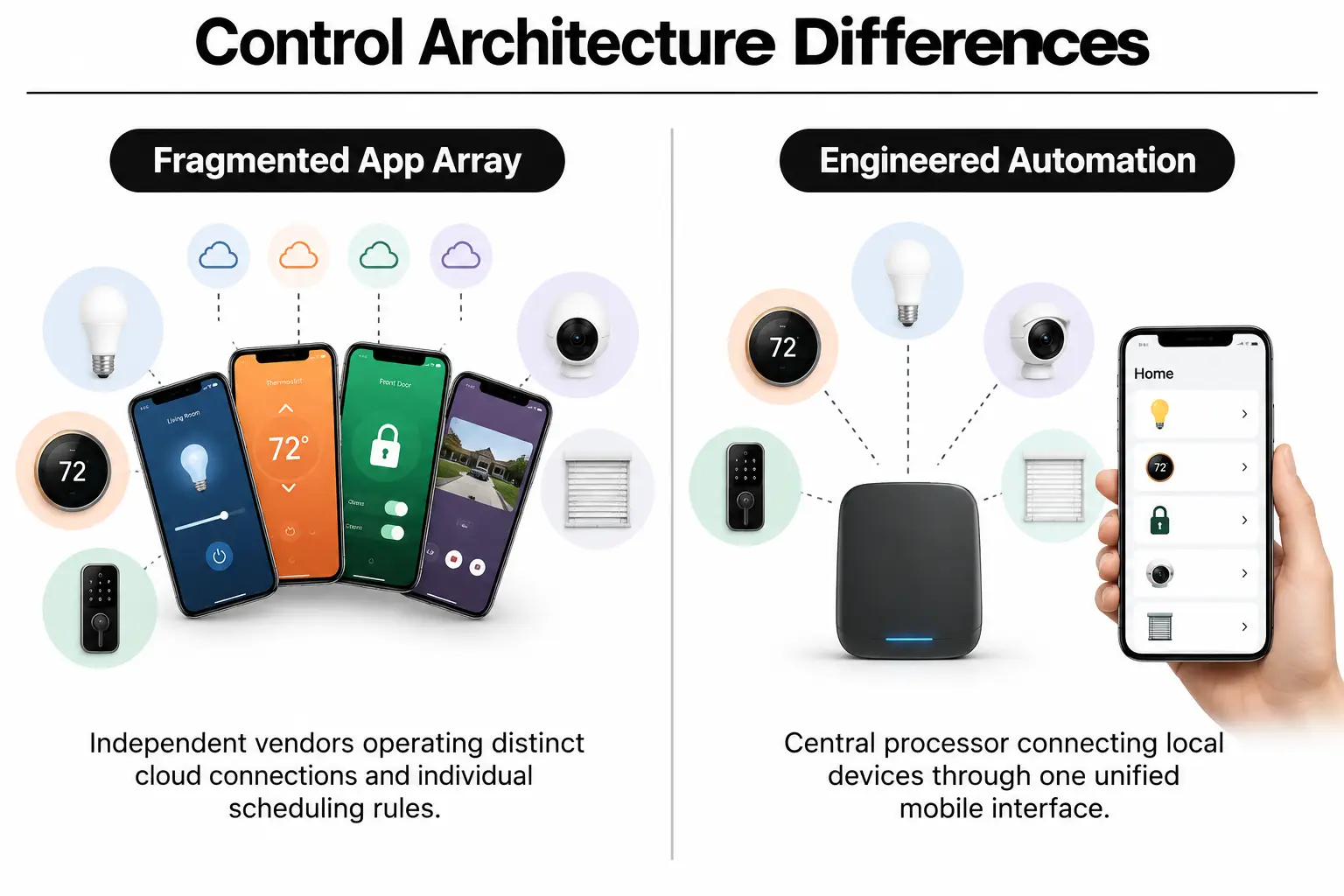
A central controller connects your thermostats, overhead lights, motorized shades, and safety monitors through one interface. According to published engineering standards, processing commands locally greatly reduces data delays and reliance on cloud services compared with multi-app setups. Devices can then work together rather than follow separate instructions.
Setting an away routine eases back your heating or cooling and secures exterior entry points. Lighting switches to its energy-saving settings without you opening five different dashboards. To find out which devices you can keep, ask our field engineers to review your current hardware and how it could fit into one system.
Efficient control in Fairfax homes means moving devices off crowded household Wi-Fi onto separate network segments managed by a purpose-built processor.
Integration Failures That Drain Residential Budgets
Most smart device problems start with planning, not faulty equipment. Building a system one retail device at a time often leaves you with brands that cannot work together. Each brand depends on its own cloud server, adding delays and leaving parts of your system vulnerable when that server goes offline.
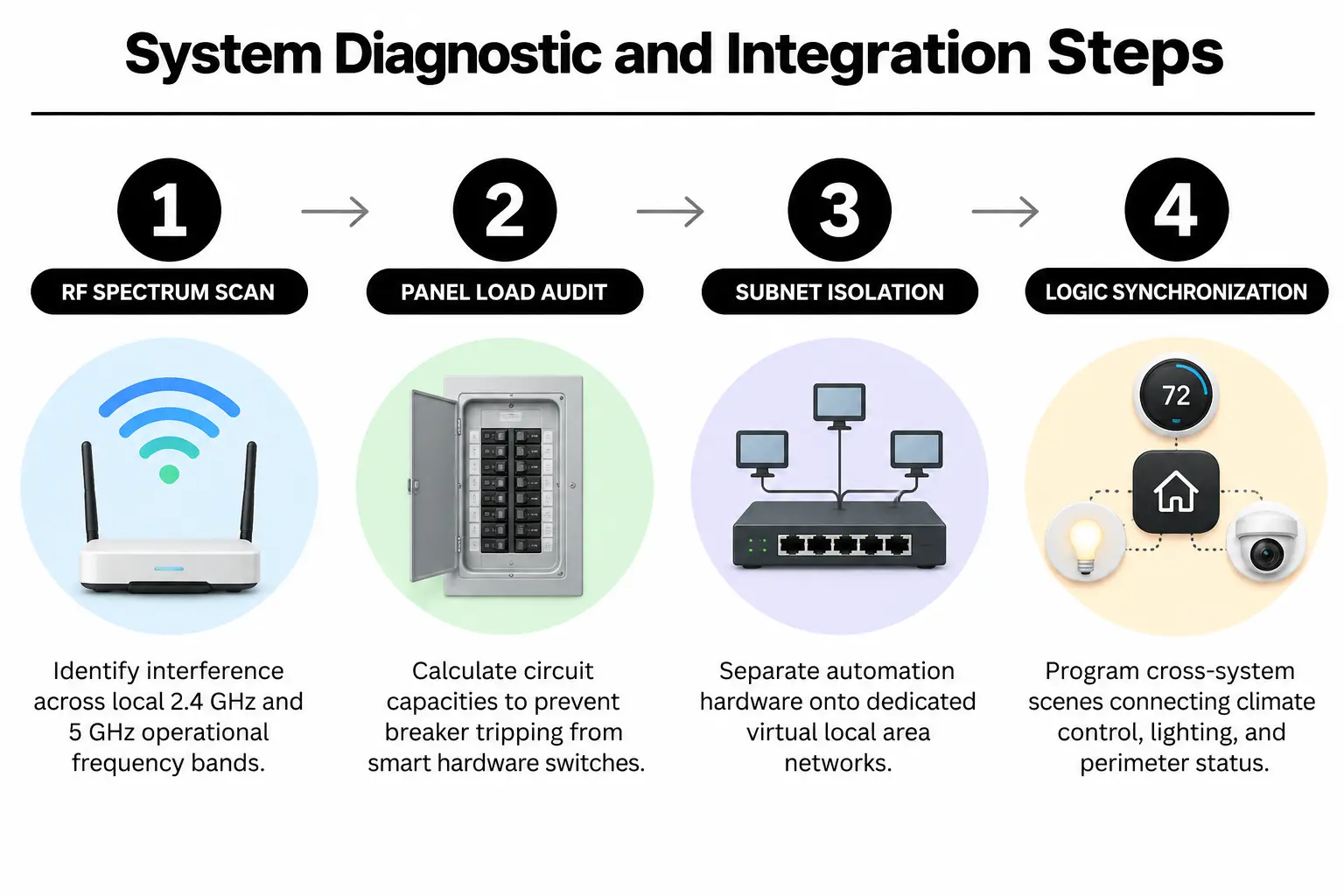
Router capacity matters too. Forty smart bulbs, plugs, and switches connected directly to a basic home router can crowd its available bandwidth. Commands get dropped, heating schedules are missed, and camera streams lag. Homeowners planning automation for energy savings in Virginia often overlook these network limits.
Renovations are the time to plan routes for low-voltage wiring. Battery-powered sensors seem convenient until you have dozens of batteries to replace. Before the drywall goes up, read our guide to four common new-construction automation mistakes for a closer look at the decisions that are harder to change later.
Fixed schedules also limit savings because they cannot tell if anyone is home. Heating still comes on when you stay late at the office. Connected systems use readings from several sensors to adjust the indoor temperature based on occupancy and the weather outside.

Investment Factors and Wiring Variables
Your home's layout and existing electrical wiring drive much of the installation cost. Older homes often need neutral wires added at wall boxes for modern smart dimmers. Running low-voltage communication wiring and calculating the load on the electrical panel also make up part of the basic installation labor.
Floor area determines how many network access points and secondary controllers are needed for steady coverage. A 2,500-square-foot home typically needs a central processor, two commercial-grade access points, and wiring back to an equipment enclosure. Larger homes need processors for multiple zones and extra power distribution modules to handle the added demand without weakening signals.
Equipment choices affect the price too. Retail devices cost less upfront but lack local communication methods. Commercial systems use radios such as Lutron Clear Connect on separate frequencies that do not crowd your home internet. Our comparison of DIY and professional quotes explains the equipment options and their effect on the total cost.
Written quotes should make the labor clear, including county electrical permits, wire runs, and software setup. Having that scope in writing avoids surprise charges during the project. Electrical planning also needs to account for current building codes before anyone adds circuits. Ask for a quote based on your home's wiring and the devices you want connected.
Operational Realities vs Common Assumptions
Complete automation does not mean tearing out walls to run miles of special cable. Dedicated low-voltage wiring is ideal during new construction, but it is not the only option. Modern hybrid processors combine wired and wireless devices, allowing reliable wireless hardware to fit into existing switch boxes without major drywall damage.
Internet outages do not have to stop your home controls. Cloud-dependent consumer systems fail because they need a connection to distant servers. A locally controlled system runs routines on a central bridge, the device that connects its components. During an outage, lighting schedules, thermostat settings, and local keypads keep working.
Standby power is another common concern. Central low-power controllers use little electricity while reducing vampire loads, the power electronics draw even when they appear off. Analysis from ENERGY STAR shows that automated temperature schedules can cut annual heating and cooling energy use by roughly 8 to 10 percent.
Multi-App Setups Compared to Engineered Unified Systems
Retail smart devices and a planned automation system differ in more than how many apps you open. These differences affect daily use and long-term running costs, especially during an internet outage or when several devices need to respond together.
| System feature | Separate retail apps | NovaProHome connected system |
|---|---|---|
| Controls | 6 to 12 manufacturer smartphone apps | 1 interface with synchronized controls |
| Network connection | Standard 2.4 GHz home Wi-Fi band | Separate virtual network with dedicated local radio bands |
| During an internet outage | Commands fail and automated routines pause | Local controller keeps routines running |
| Energy controls | Separate timers for each device | Shared routines for climate, shades, and lighting |
| Engineering review | Self-installed without panel load calculations | Design by an engineer with a B.S. in electrical engineering, with permits |
At NovaProHome, we replace disconnected consumer apps with a shared local processor. The installation scope depends on the equipment you already own and the wiring needed to bring those devices together. Ask for a quote for your home rather than relying on a general price figure.
Technical Answers for Fairfax System Planning
How can I control all my smart devices with one app?
One central automation bridge translates the different communication methods your devices use into a single dashboard. Rather than sending commands through third-party cloud servers, devices communicate directly with a processor in your home. That processor gives you one app for managing the connected equipment.
What should I expect for smart home system installation?
Installation starts with an electrical panel review and a check of Wi-Fi frequencies to avoid crowded channels. From there, the work includes any needed low-voltage wiring, control bridges, and connected lighting switches. Custom routines are configured before testing that the local controls still work without internet access.
Where can I find reliable home automation near me?
Check a provider's state electrical licensing and liability coverage, and ask if the system uses standards shared by multiple manufacturers. For your Fairfax home, the design should account for power-hungry appliances and circuit limits. An engineering review addresses those loads along with the network connections your controls depend on.
What is the best whole home automation solution for my house?
Existing wiring and the number of devices matter, as does your home's layout. Established systems such as Lutron lighting paired with a central processor offer reliable control and room to expand later. For details on our work, read what our automation services include.
How do automated home systems reduce monthly power bills?
Connected controls coordinate heating schedules with window shades and occupancy sensors so equipment does not keep heating or cooling empty rooms. They also shut off standby power to entertainment equipment. Appliances with high power demand can be scheduled for off-peak hours rather than running during peak periods.
Can I combine home security and automation on the same platform?
Yes, smart locks, contact sensors, exterior lights, and cameras can share the same processor. Arming the perimeter alarm can trigger the garage door to close and the thermostat to use its away setting. Doors can lock as part of that routine without you opening separate security apps.
Plan Your Unified System Architecture
To bring your existing devices under one local controller, request a home assessment with NovaProHome so we can review your wiring and plan for long-term electrical reliability.
Ready to engineer your smart home?
Start with a free 20-minute discovery call. No pressure, no sales script — just a plan.