

Ring Retrofit Alarm Kit vs. Full Ring Alarm: Which Do I Need?

If your home has working copper loops hidden behind the trim, the Retrofit Kit lets you keep those wired sensors and add app control. Without usable wiring, choose a wireless Ring Alarm setup.
For homes without pre-wired doors and windows, wireless sensors paired with a full-service Ring doorbell and camera installation offer a quicker route. You won't need to test old copper lines that may no longer work. The choice starts with checking the existing wiring or fitting new wireless contact sensors.
The wrong choice can mean weeks of troubleshooting or wall repairs you didn't need. At NovaProHome, we regularly see One Loudoun homeowners struggling with old terminal panels in utility closets. A wireless hub would have taken an hour to set up.
What's Inside This Guide
- Why Legacy Alarm Wiring Changes Your Hardware Choice
- Evaluating Your Existing Sensor Panel Terminals
- Matching Your Floorplan and Door Types to Hardware
- Integrating Keypads, Cameras, and Perimeter Hardware
- Testing and Connecting Old Zones Correctly
- Allocating Hardware Costs Without Wasting Money
- Common Alarm Conversion Inquiries
- Planning Your System Architecture in One Loudoun
Why Legacy Alarm Wiring Changes Your Hardware Choice
Many multi-story homes in One Loudoun have low-voltage alarm wires running behind the trim to a central basement box. Before reusing them, check for cut lines inside finished door frames or corroded magnetic contact switches. Finding these problems after ordering parts delays protection and adds electrical testing you hadn't budgeted for.
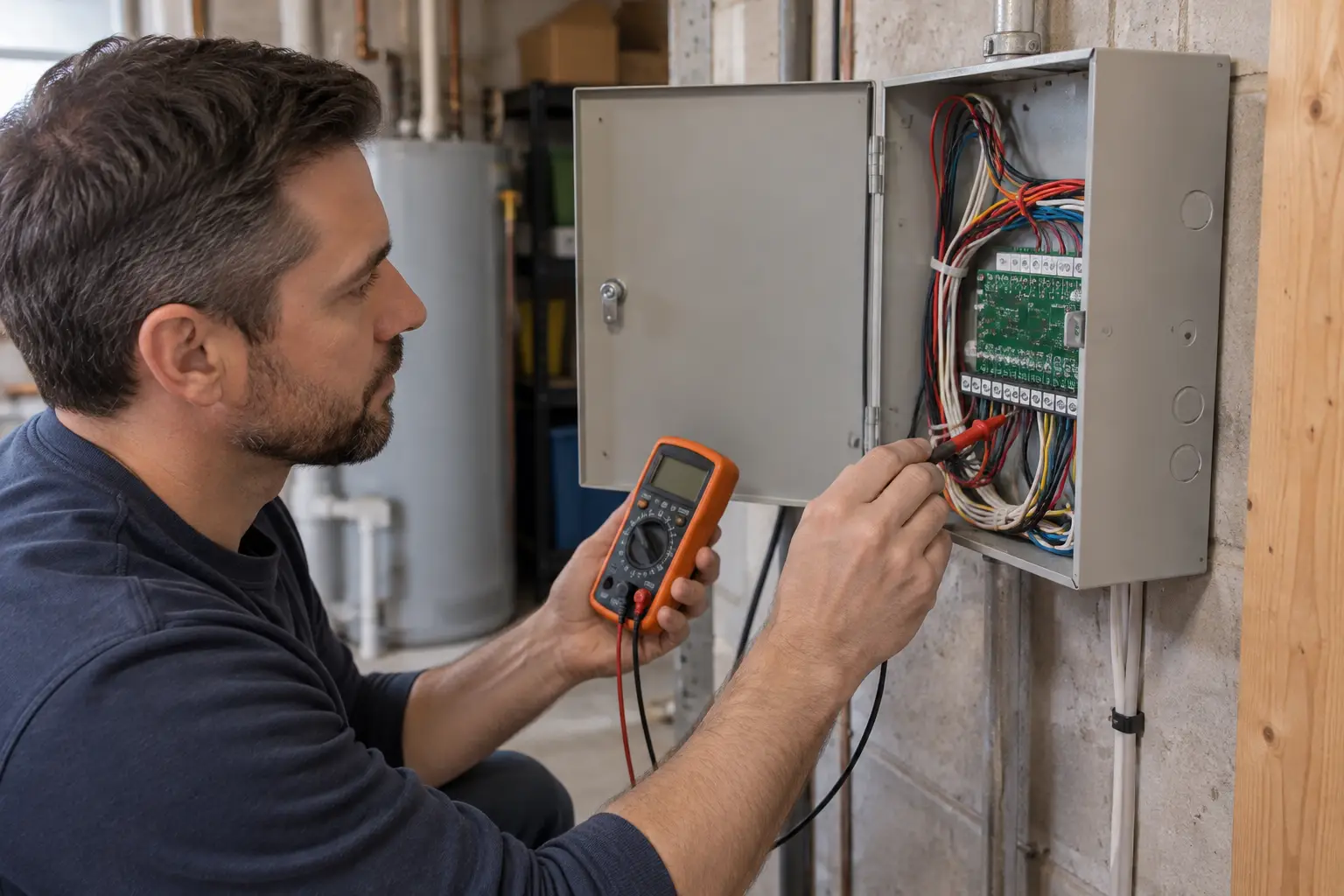
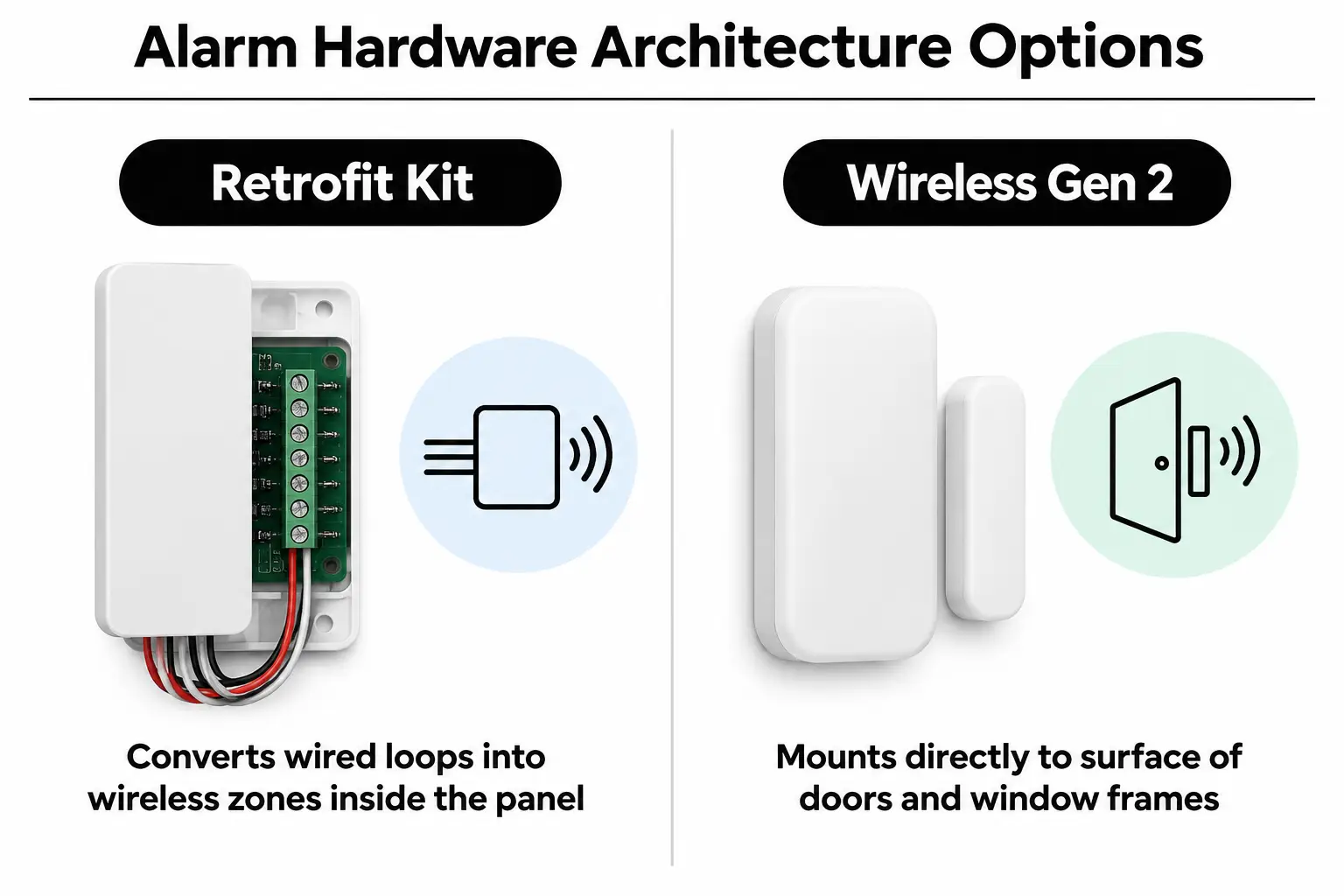
The Retrofit Kit connects up to eight wired zones per board to an active Ring Alarm base station. It does not supply power to older glass break detectors or motion sensors. DIY installations often stall because the homeowner hasn't checked which wire pairs carry power and which simply report an open contact.
Practical check: The Retrofit Kit works only with contact loops that need no power and stay closed at rest. Powered motion or smoke detectors need separate Ring replacements.
Before buying parts, read our guide to getting a Ring Alarm installed in Leesburg for how local home layouts affect wired zones. Test continuity, meaning whether electricity can pass through the complete loop. Skipping that check can leave hidden wiring faults that disable your base unit's entire monitoring setup.
Evaluating Your Existing Sensor Panel Terminals
Start with the metal alarm box, usually in a basement utility room or laundry closet. Inside, you'll find color-coded copper wires attached to screw terminals. If the wire groups are intact and labeled for areas such as the front entry or basement sliders, a retrofit is a sensible option.
Wired Interface Versus Pure Wireless Hardware
Keeping wired jamb sensors means you won't have plastic pods visible on your window frames. That matters if you want to preserve the trim's appearance. But if contractors cut lines while finishing the basement or replacing trim, peel-and-stick Z-Wave sensors are usually more practical than new wiring. Z-Wave is the wireless system those sensors use to communicate.
| Hardware Option | Recommended Starting Point | What to Watch |
|---|---|---|
| Ring Retrofit Alarm Kit | Homes with labeled, intact contact loops that need no power | Missing zone charts and broken magnets that leave circuits open |
| Standard Ring Alarm (Gen 2) | Newer additions or open layouts without existing alarm wiring | Thick decorative molding that keeps sensor magnets from lining up |
| Mixed wired and wireless setup | Wired doors downstairs, wireless sensors on upstairs windows | Z-Wave signals weakened by steel floor supports or foil insulation |
Take care around older panels, especially those with unlabelled high-voltage transformers or shared electrical circuits. Stop and call a licensed professional before touching the main power wires. For more checks on device health, read our guide to fixing a Ring doorbell that won't stay connected.
Matching Your Floorplan and Door Types to Hardware
The doors and windows themselves help determine which sensors will fit. French patio doors and metal sliders can make surface mounting awkward, as can deep-set wood window frames. Thin wired contacts hidden in the jambs avoid the alignment problems that surface sensors can develop as wood expands with humidity.
Finished basements often have broken copper lines hidden behind drywall. Tracing an intermittent fault in an eight-year-old wire run can take entire weekends. In that case, replacing just that zone with surface-mounted Gen 2 wireless contact sensors gives you reliable coverage without chasing the break through the walls.
| Installation Situation | Recommended Choice | What to Avoid |
|---|---|---|
| Custom wood doors with hidden jamb switches | Retrofit Alarm Kit connected to the original contacts | Adhesive wireless sensors that pull paint off custom woodwork |
| Metal door frames with magnetic interference | Wireless Gen 2 sensor with the factory offset spacer | Reusing flush contacts without checking how their magnetic switches respond |
| Finished multi-story homes without accessible wiring routes | Wireless Ring Alarm with range extenders | Pulling low-voltage wire through insulated exterior walls with fire blocking |
Installer's rule: Don't trust handwritten labels on 15-year-old junction boxes until you've checked continuity at each door with a multimeter.
If you're unsure where devices should go, contact the NovaProHome team for a look at your home layout. We map every entry point before setting up the system, so the plan matches the doors and windows you actually have.
Integrating Keypads, Cameras, and Perimeter Hardware
Your alarm works alongside outdoor cameras and front-door monitoring, so plan them together. Check how you'll power the video equipment before fitting the hub and outside sensors. Our guide to wired versus battery-powered video doorbells compares the options and helps you decide if new wiring makes sense at the front of your home.
You can also connect smart entry hardware so disarming the base station automatically releases the deadbolts. Our guide to smart locks that work with Ring Alarm covers compatible Z-Wave deadbolts that communicate with your central hub.
| Starting Point | Pairing Direction | What to Test | Intended Effect |
|---|---|---|---|
| Retrofit Kit hub | Outdoor floodlight cameras | Wi-Fi signal strength outside brick walls | Lights turn on automatically when perimeter contact zones open |
| Full wireless Ring Alarm | Z-Wave smart deadbolts | Distances between Z-Wave signal repeaters across drywall | One PIN entry disarms the alarm and releases exterior deadbolts |
| Base station + keypad | Video doorbell chime circuits | Transformer voltage ratings (16V to 24V AC) | An immediate doorbell chime throughout indoor living areas |
The Z-Wave Alliance defines standards for low-frequency radio communication that avoids crowded 2.4 GHz channels. If you're planning broader home automation, read our guide to choosing a hub for Ring, Nest and Lutron. It explains how to bring separate systems into one dependable setup.
Testing and Connecting Old Zones Correctly
We test each wired loop before connecting a retrofit kit. Don't attach old wires to the conversion terminals until you've confirmed that each pair opens and closes reliably. One wire touching ground can leave the whole zone reporting a fault that won't clear.
Video: Ring Retrofit Alarm Kit setup and installation review (LifeHackster)
- Disconnect power: Disconnect the backup lead-acid battery, then unplug the old panel's step-down transformer from the wall outlet.
- Measure loop resistance: Set a digital multimeter to ohms and test each wire pair. With the door closed, it should read under 5 ohms of resistance.
- Check the contacts: Ask a partner to open the door while you watch the meter. It should immediately show infinite resistance, meaning an open circuit.
- Remove line resistors: Older panels used end-of-line resistors. Find and isolate these if your starting resistance reading is unusually high.
- Connect the terminals: Secure the tested copper pairs in the Retrofit terminal slots, then complete the pairing steps in the app.
Before you buy: If old contacts read above 10 ohms when closed, clean them or use a wireless sensor for that zone.
For outdoor cameras, set the detection areas carefully so passing street traffic doesn't trigger constant alerts. Our walkthrough on setting privacy zones on Ring and Nest cameras explains how to keep alerts focused on the area around your home.
Allocating Hardware Costs Without Wasting Money
You don't need to replace every device to update your security system. In an eight-zone home with working door contacts, one retrofit module saves you from buying eight separate wireless contact sensors. That leaves more of the budget for outdoor camera coverage instead of replacing sensors that already do their job.
But spending hours pulling replacement wire through finished ceilings to rescue a broken loop can waste that saving. If the old wiring has failed, leaving those runs unused and fitting wireless sensors cuts labor costs. We weigh the condition of the wiring before committing to either approach.
| Budget Level | What to Prioritise | What to Question |
|---|---|---|
| Basic conversion ($) | Retrofit Kit for working loops plus a base station package | Replacing working recessed door contacts with surface-mounted sensors |
| Selective wired and wireless setup ($$) | Retrofit Kit for doors with wireless glass break sensors | Connecting old powered motion sensors to terminals that supply no power |
| Complete replacement ($$$) | Full wireless security kit with wired outdoor cameras | Paying to pull low-voltage wire through finished drywall ceilings |
Put priority spending toward outdoor lighting and clearly visible entryways. A properly mounted outdoor camera package offers more practical value than replacing working window contacts hidden inside finished trim. Keep the parts that work and spend where the coverage needs improvement.
Common Alarm Conversion Inquiries
Can I hire a ring doorbell installation near me to wire the retrofit board?
Yes. Professional installers can handle your front-door camera and low-voltage basement alarm panel during the same appointment. You won't have to work through the old copper loops and terminal connections yourself.
Who installs ring doorbells for me alongside security alarm hubs?
An official Ring Authorized Partner can mount doorbells and set up alarm base stations in one visit as part of a whole-home security installation. That avoids waiting for separate trades to wire the equipment and test the finished setup.
Can someone install my ring camera if my Wi-Fi signal is weak?
Professional installers check your wireless network and add chime extenders or extra access points where needed. They choose camera positions with a strong connection before fixing brackets to the siding. That addresses the signal problems that cause live video to drop out.
Where do I find a nest camera installer who also handles hybrid setups?
Low-voltage specialists often work across brands and can coordinate Google Nest outdoor cameras with a Ring Alarm system. Our technicians also set up the alerts so the two platforms don't send conflicting notifications to your phone.
What causes trouble installing ring doorbell hardware on legacy chimes?
Most setup errors come from weak step-down transformers supplying less than 16 volts AC. That keeps the video circuitry from charging properly. Replacing the underpowered chime transformer in the utility area stabilizes the doorbell's power supply.
Planning Your System Architecture in One Loudoun
The choice depends on the condition of your wiring and how much panel troubleshooting you're willing to do. At NovaProHome, we bring genuine Ring hardware to your One Loudoun home at retail pricing. We handle the wiring and mounting, then connect the software during one planned appointment.
Before choosing your equipment, check these points at your existing panel and around the house:
- Terminal labels: Check whether the existing alarm box has clear labels for each zone.
- Multimeter test: Confirm that wired door loops show a closed circuit with resistance below 5 ohms.
- Power isolation: Check that powered motion sensors have their own separate power sources.
- Base placement: Find a central spot with a strong broadband connection for the base station.
- Combined installation: Decide if you want a full-service Ring doorbell and camera setup fitted during the same visit.
To avoid shipping delays and days of DIY troubleshooting, request a quote from NovaProHome for your One Loudoun alarm and camera installation.
Ready to engineer your smart home?
Start with a free 20-minute discovery call. No pressure, no sales script — just a plan.