Common Google Home & Ring App Notification Setup Mistakes
Missed alerts and false alarms often come from camera detection zones that conflict with your phone’s background settings. For local Ring security camera setup, we check both ends: what the camera detects and whether your phone can receive alerts without battery-saving settings delaying them.
We cover installation in more detail in our post on having NovaProHome install your Ring doorbell, cameras and alarm.
A missed alert can mean an unnoticed delivery or an intruder approaching while your house is empty.
In South Riding, Virginia, large lots and detached garages often stretch home Wi-Fi coverage. That can delay notifications between Ring devices and paired Google Home screens. We adjust detection sensitivity and app permissions, then check third-party connections to cut unwanted motion alerts without hiding activity you need to see.
What's Inside This Guide
- Why Mobile Alert Routing Breaks Down
- Configuring Smart Alerts Across Platforms
- Cross-App Alerting Compared to Single-App and Hardwired Chimes
- Three Methods for Managing Multi-App Security Ping Rates
- Matching Notification Configurations to Your Household Schedule
- Maintaining Reliable App Pings and Battery Sync
- Questions South Riding Residents Ask About Smart Alerts
- Getting Your Security Setup Dialed in South Riding
Why Mobile Alert Routing Breaks Down
An alert does not go straight from your doorbell camera to your phone. It passes through the camera hardware, your router and the manufacturer’s cloud servers before reaching your phone’s notification service. A failure anywhere along that route can leave your phone silent while someone walks up to your porch.
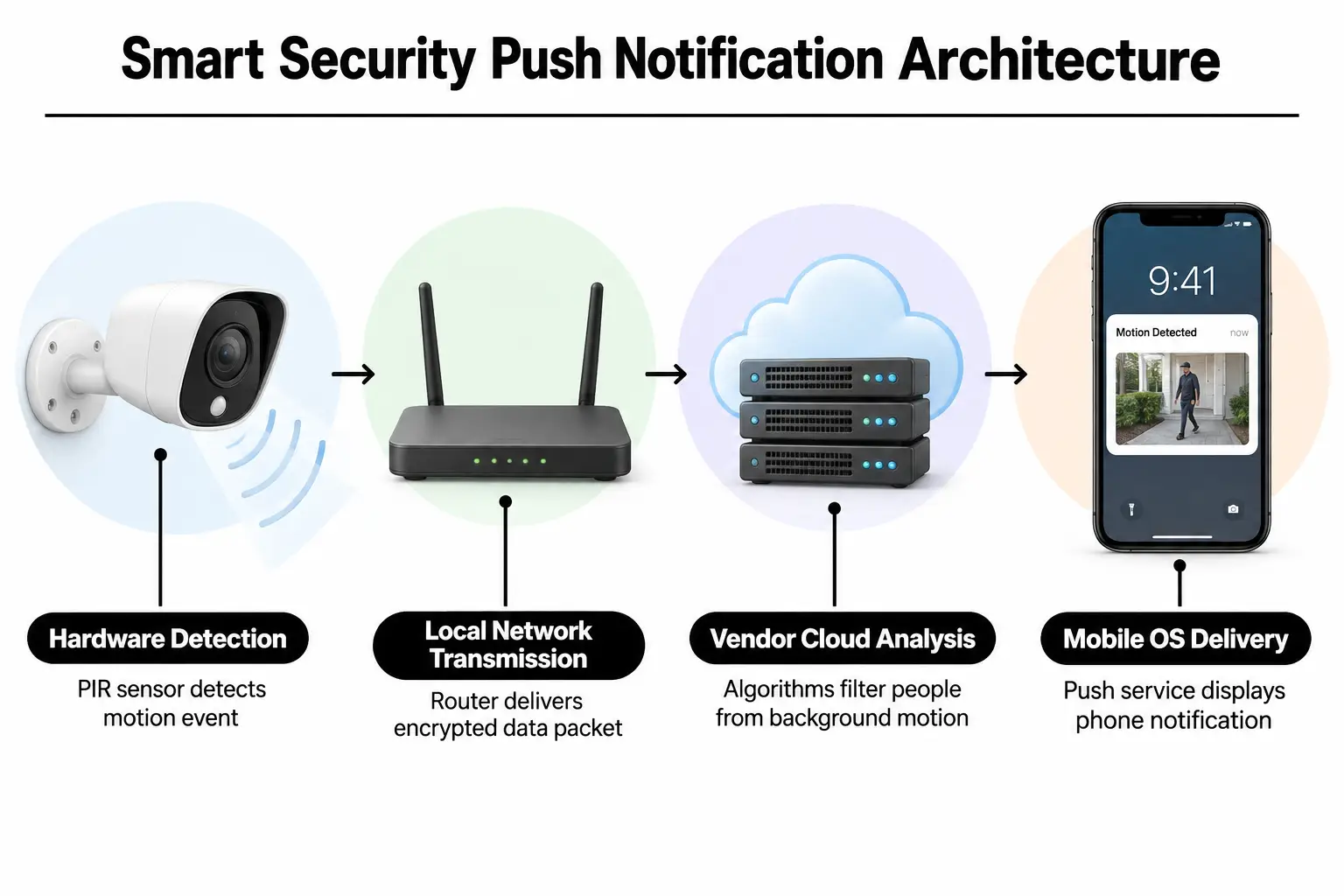
These parts of your alert setup are worth checking when your Ring system stops sending messages:
- Passive infrared sensors (PIR): These hardware sensors detect body heat moving through an area. They do not rely only on changes in the pixels of a camera image.
- Cloud token handshakes: These secure exchanges verify communication between Amazon Web Services or Google Cloud and phone notification servers. Those servers include Apple’s push notification service (APNs) and Google’s Firebase Cloud Messaging (FCM).
- Smart alert filters: Software on cloud servers checks recorded video frames. It separates people from other movement, such as passing cars or branches blowing in the wind.
- Phone power-saving tools: Your phone’s operating system can put unused apps to sleep to save battery. That can delay messages arriving while the app is closed.
A Ring system installer removes signal problems so the hardware and software can communicate without delays.
Configuring Smart Alerts Across Platforms
To get visitor alerts on your phone and Google Home displays, work through the setup in order. Open the Ring app and select your device. Set motion frequency to frequent rather than regularly. The regular setting lets the camera sleep briefly after motion, often missing people walking quickly up long South Riding driveways.
Video: Fixing delayed Ring 2 doorbell notifications (Mike Miller)
Next, sign in to link your Ring skill within Google Assistant or Google Home. Our guide to setting privacy zones on Ring and Nest cameras explains how to keep detection focused on your property. Once linked, assign each Ring camera to a room so Google Home hubs know where to announce visitors.
If pairing stalls while you install your Ring doorbell, ask our technicians to check it. We can verify whether your router’s firewall is preventing the devices from finding each other.
The Critical Wi-Fi Protocol People Skip
Most notification delays come from band steering, a router feature that moves devices between Wi-Fi bands. Many routers try to move 2.4 GHz cameras onto 5 GHz, losing data during transmission. Keeping cameras on a separate 2.4 GHz smart home network ensures that alert data reaches cloud servers in milliseconds.
For larger outdoor areas, see our advice on placing outdoor security cameras to make sure their antennas get a strong signal.
Cross-App Alerting Compared to Single-App and Hardwired Chimes
You can route alerts through one platform or keep each device’s own app on your phone. Connecting Ring to Google displays gives you hands-free announcements, while separate native apps show video with less delay. A hardwired mechanical chime bypasses software, giving you an audible backup when the internet goes down.
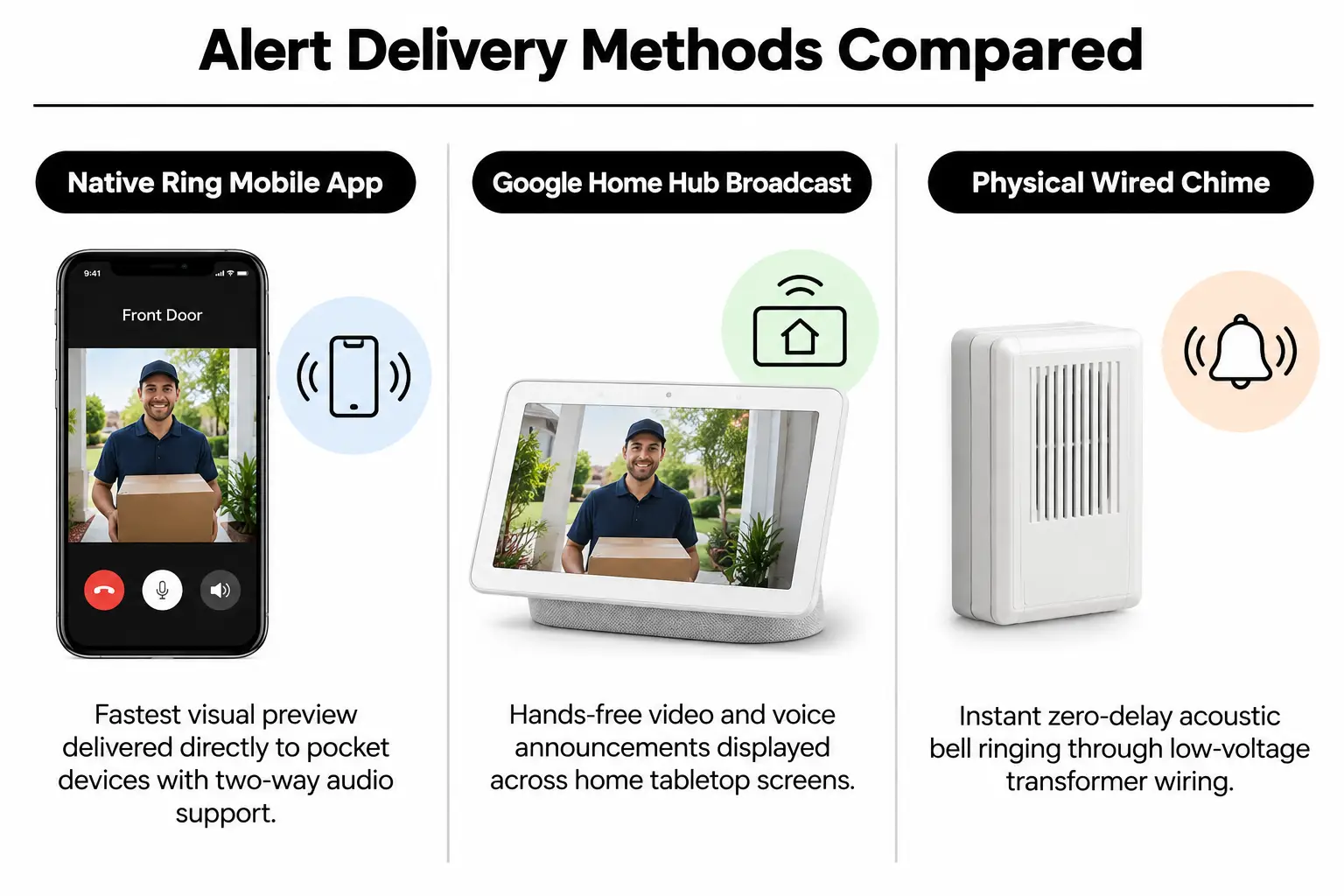
| Notification channel | Alert speed | Setup effort | Visual confirmation | Hardware backup | Best fit |
|---|---|---|---|---|---|
| Ring mobile app | Instant (under 2 sec) | Low | Thumbnail image preview | Phone cellular only | Main smartphone alerts |
| Google Home display connection | Moderate (3 to 6 sec) | Moderate | Automatic video pop-up | Depends on home Wi-Fi | Hands-free viewing at a kitchen counter or desk |
| Hardwired mechanical chime | Immediate (0 sec) | High (low-voltage wiring) | Sound only | Powered by the transformer circuit | Audible alerts throughout the house |
A full-service Ring doorbell and camera package ensures your phone alerts and indoor chimes sound together as soon as someone presses the button.
Three Methods for Managing Multi-App Security Ping Rates
When several family members receive alerts, too many notifications can push people to mute their security apps altogether. The filters need to cut routine noise without hiding something urgent. We use the notification settings to strike that balance.

- Cloud-only smart verification: Cloud servers check every motion clip before your phone buzzes, sending alerts only when they spot a human shape. Pro: Reduces false alarms from trees and pets by nearly 90 percent. Con: Your phone vibrates 1 to 2 seconds later while the clip is checked.
- Scheduled notification snoozing: Silences non-critical chimes during regular front-yard activity, such as lawn care, dog walks or children playing. Pro: Makes it less tempting to turn off phone alerts entirely. Con: An unwanted visitor can arrive during the snooze period without triggering an alert.
- Shared user accounts: Gives pet sitters or guests their own accounts rather than sharing your main administrator login. Pro: Lets you limit alert permissions and keep track of who accessed the system. Con: Secondary users need to verify their accounts again when they replace their phones.
If you want a Ring camera that can recognize people on the device itself, match the model to your driveway’s length. That matters when choosing the right hardware.
Matching Notification Configurations to Your Household Schedule
A home with a dog walker visiting every day needs different settings from one left empty for weeks during vacation. Your alerts should reflect who normally comes to the house and when. These are the configurations we recommend for common household routines in South Riding.
| Household situation | Recommended setup | Main risk | Routine settings check |
|---|---|---|---|
| Long vacation or empty home | Maximum sensitivity, alerts across platforms | Too many weather-related alerts | Confirm Ring can use background data |
| Daily contractor or pet sitter visits | Smart lock PIN alerts confirmed by camera | Missed notifications when codes are shared | Check temporary PIN expiry dates weekly |
| Busy suburban lot | Person-only detection with tight zone boundaries | Missing visitors at the edges of the lawn | Adjust detection zone outlines each season |
| Managing several properties | Separate location profiles in the Ring dashboard | Muting the wrong home’s profile while traveling | Check location switching before leaving town |
Pairing the right hardware makes it easier to manage entry access alongside camera alerts. Our guide to smart locks that work with a Ring alarm system explains how to connect guest entry PINs with automatic recording.
Installer’s rule: Turn off battery optimization for the Ring app in your phone settings. Aggressive background battery savers cause over 80 percent of delayed smart home notifications.
Maintaining Reliable App Pings and Battery Sync
Phone updates can disrupt a setup that was working well. New iOS and Android releases frequently reset background app permissions without notice, stopping push alerts. Check those permissions even if you have not changed the camera settings.
Quarterly Smartphone and Sensor Maintenance
- Check background app permissions: Make sure your phone has not switched off background app refresh or put Ring into deep sleep, which limits activity while the app is closed.
- Check doorbell transformer voltage: Open the Ring app’s device health panel. Confirm that power to your hardwired doorbell stays steady between 16 and 24 volts AC.
- Clean camera lenses: Wipe away pollen and dust, along with any spiderwebs covering the lenses or infrared emitters. Clear covers help the motion detection software work accurately.
- Test backup power: Read our guide to smart security during a power outage. Check that your alarm’s cellular backup takes over correctly when Wi-Fi drops.
If a device suddenly loses communication range, check your home’s power supply and the router’s signal strength. Those checks usually reveal the cause.
Questions South Riding Residents Ask About Smart Alerts
Why does my Ring doorbell take ten seconds to notify my phone?
The cause is almost always battery optimization putting Ring to sleep or a weak 2.4 GHz Wi-Fi signal at the door. Exempt Ring from power saving and check for a signal of at least minus-65 dBm, a measure of signal strength. These changes restore immediate alerts.
Can someone install my ring camera and calibrate the notification zones?
Yes. A smart home technician can mount the camera and connect its low-voltage power during one appointment. They also test motion zones against live phone alerts. This makes sure the camera catches visitors at your property boundary without sending alerts for passing street traffic.
Why are my Ring notifications not announcing over my Google Home speakers?
Google Home needs the Ring skill linked and guest announcements enabled in your assistant settings. A device software update can break the authorization token, the credential that keeps the accounts connected. Unlinking and adding the account again in Google Home restores spoken doorbell alerts.
Where to find ring alarm setup help if false motion alarms keep sounding?
False alarms usually start with indoor motion detectors facing heat vents, sunny windows or routes used by pets. Move the sensors five to seven feet above the floor and angle them away from direct sunlight. This stops heat changes from triggering false alarms.
Can I get ring security system price estimates before scheduling setup?
Yes, you can get a fixed price estimate before booking. Share your home’s layout and the number of entry points, plus details of the existing doorbell chime wiring. That takes the guesswork out of pricing and helps us choose alarm sensors suited to your home’s size.
Getting Your Security Setup Dialed in South Riding
Missed chimes and app connection problems can be frustrating to sort out. As an official Ring Authorized Partner, NovaProHome supplies genuine hardware at retail prices in South Riding, Virginia. We handle the mounting and wiring, then configure the apps in one visit. You do not need separate contractor appointments or wait for boxes to arrive.
For a Ring installation, choose someone who checks these details before calling the job finished:
- Electrical engineering background: Checks that low-voltage transformers deliver the correct power without overheating your chime boxes.
- Same-day mounting and setup: Tests every camera and contact sensor, along with app notifications, before leaving your home.
- Careful zone settings: Sets motion boundaries around your property so cars passing on the street do not buzz your phone at night.
- Connected smart controls: Links the alarm with door locks and cameras so everyone in the family can use the system without confusion.
Our local team can set up your Ring alarm or supply and install a doorbell camera, saving you a store trip. See what NovaProHome offers, or compare DIY and professional Ring camera installation in Arcola for a closer look at the setup work involved.
Contact the NovaProHome team to book your home setup and get your visitor alerts working reliably.
Ready to engineer your smart home?
Start with a free 20-minute discovery call. No pressure, no sales script — just a plan.