

Can I Use My Existing Doorbell Chime With a Smart Doorbell?

Yes, you can usually keep your mechanical chime when you add a video doorbell. Your low-voltage transformer must supply enough power for both.
Most older chimes run on 10 to 16 volts AC. Modern smart security systems need a steady 16 to 24 volts AC to keep the camera recording and its Wi-Fi connected without buzzing or failing.
For more on planning a setup, read our renter's guide to smart home security in Northern Virginia.
A working bell doesn't prove that your wiring can carry enough current for a camera. An undersized transformer can drop connections or trigger false rings. It can also leave the doorbell dead just when you need footage. We cover routine checks in our smart home security maintenance checklist.
What's Inside This Guide
- Why Voltage Planning Protects Your Existing Chime
- Five-Step Transformer and Wiring Verification Workflow
- Matching Your Doorbell Model to Your Current Chime Box
- Chime Connectors, Puck Adapters, and Electrical Details
- Project Phases, Installation Timing, and Cost Factors
- Answers to Common Doorbell Chime Compatibility Questions
- Plan Your Smart Doorbell Installation in Sterling
Why Voltage Planning Protects Your Existing Chime
Connecting a camera doorbell without checking the circuit can leave you chasing electrical faults later. A standard doorbell button simply closes a circuit so a striker hits the brass chime bar.
Video doorbells need a small, constant flow of electricity to stay online. They also send a burst of current to ring the bell when someone presses the button. Our guide explains what happens to smart security during a power outage.

Preventing Transformer Burnout and Equipment Damage
A transformer rated at just 10VA (volt-amps, a measure of power capacity) leaves a connected video doorbell short of power. The chime may hum or fail to ring fully, and pressing it may reboot the camera. Excess current drawn through an undersized transformer also creates heat behind drywall or inside utility closets. That is an electrical hazard.
Eliminating Ghost Ringing and App Inconsistencies
Uneven resistance in the chime circuit often causes the bell to ring on its own, even at night. During a recharge cycle, the device can leak current through the chime coil. Planning the components as one system prevents these unwanted rings.
For hardware that works together throughout your home, compare custom and off-the-shelf security systems in Sterling before choosing your equipment.
Installer's rule: Check the transformer's stamped rating before mounting a camera doorbell. Anything below 16V 30VA will cause unexpected reboots when night vision runs.
Five-Step Transformer and Wiring Verification Workflow
Check the house wiring before you unpack the new doorbell. This inspection sequence helps you check the circuit safely and avoid hours of work with unsuitable hardware.
Video: Installing a doorbell transformer and chime (Apartment Maintenance Pro)
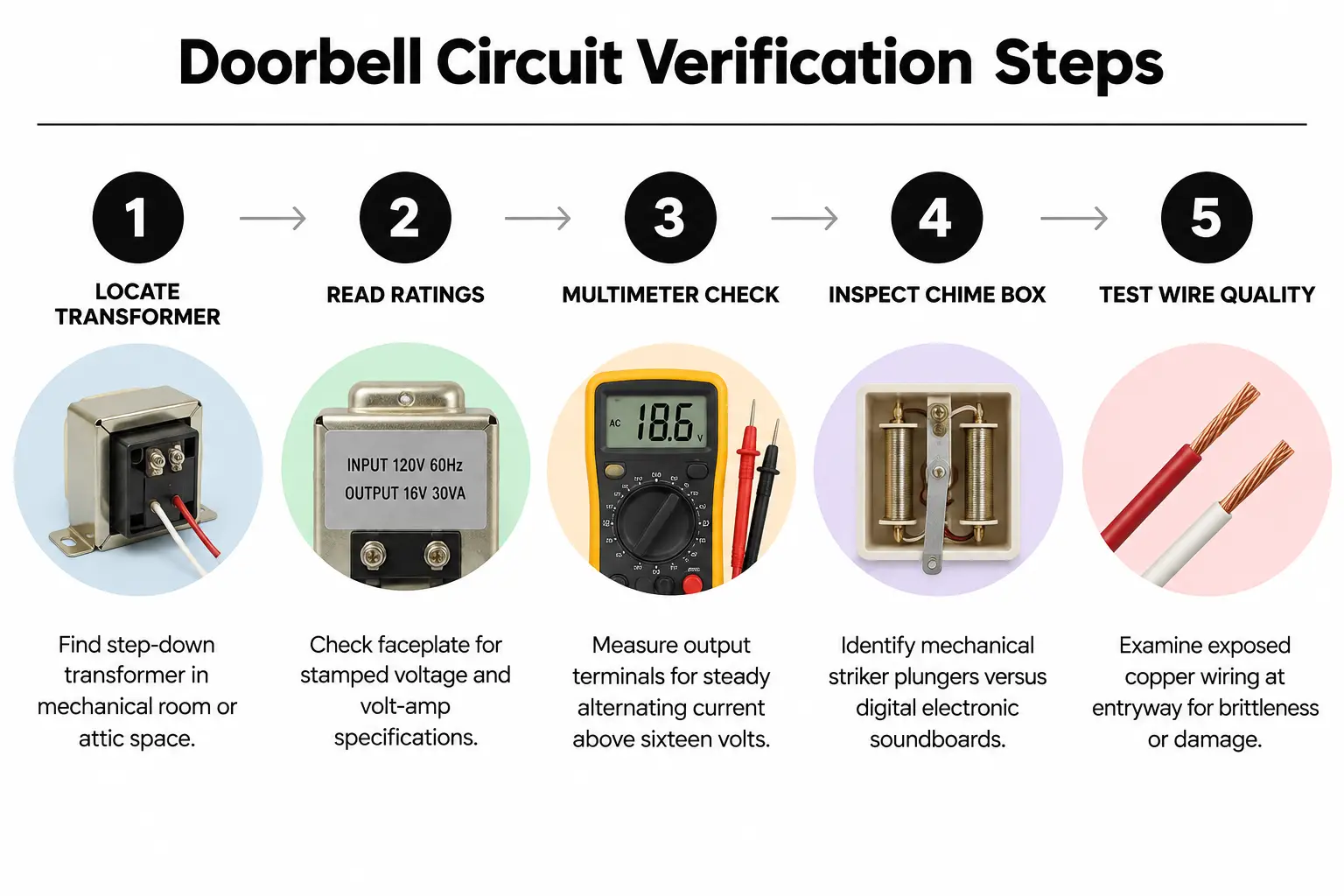
- Find the step-down transformer: Check the mechanical room and the area near the main breaker panel, then look inside the attic access hatch. You're looking for a small metal cube attached directly to a junction box.
- Read the stamped ratings: Look on the metal faceplate for voltage and volt-amp ratings. Basic units need at least 16V 10VA. For modern smart equipment, 16V 30VA or 24V 40VA is ideal.
- Measure output with a multimeter: Set your digital meter to AC voltage, following standard measurement practices established by organizations such as IEEE. Measure across the two screw terminals. A reading below 16 volts means the power source needs upgrading.
- Check inside the chime box: Remove the indoor chime's plastic cover. Look for mechanical plungers, which are small hammers that hit metal plates, or an electronic board with a speaker.
- Inspect the doorbell wires: Remove oxidation from the two push-button leads at the outside door frame. Check that the copper core isn't brittle or frayed.
Deciding Between Digital Chime Kits and Mechanical Bells
Electronic chimes that play a melody through a speaker need a special bypass diode or power pack from the camera manufacturer. Mechanical two-note bells are easier to keep. Digital speaker units need resistors placed exactly as directed to avoid burning out the soundboard.
Matching Your Doorbell Model to Your Current Chime Box
Your choice depends on keeping the familiar wall chime or using wireless smart speakers around the house. In larger homes, sound needs to reach beyond the front hallway. Property owners often ask us about planning security for a large house so they can hear alerts throughout the space.
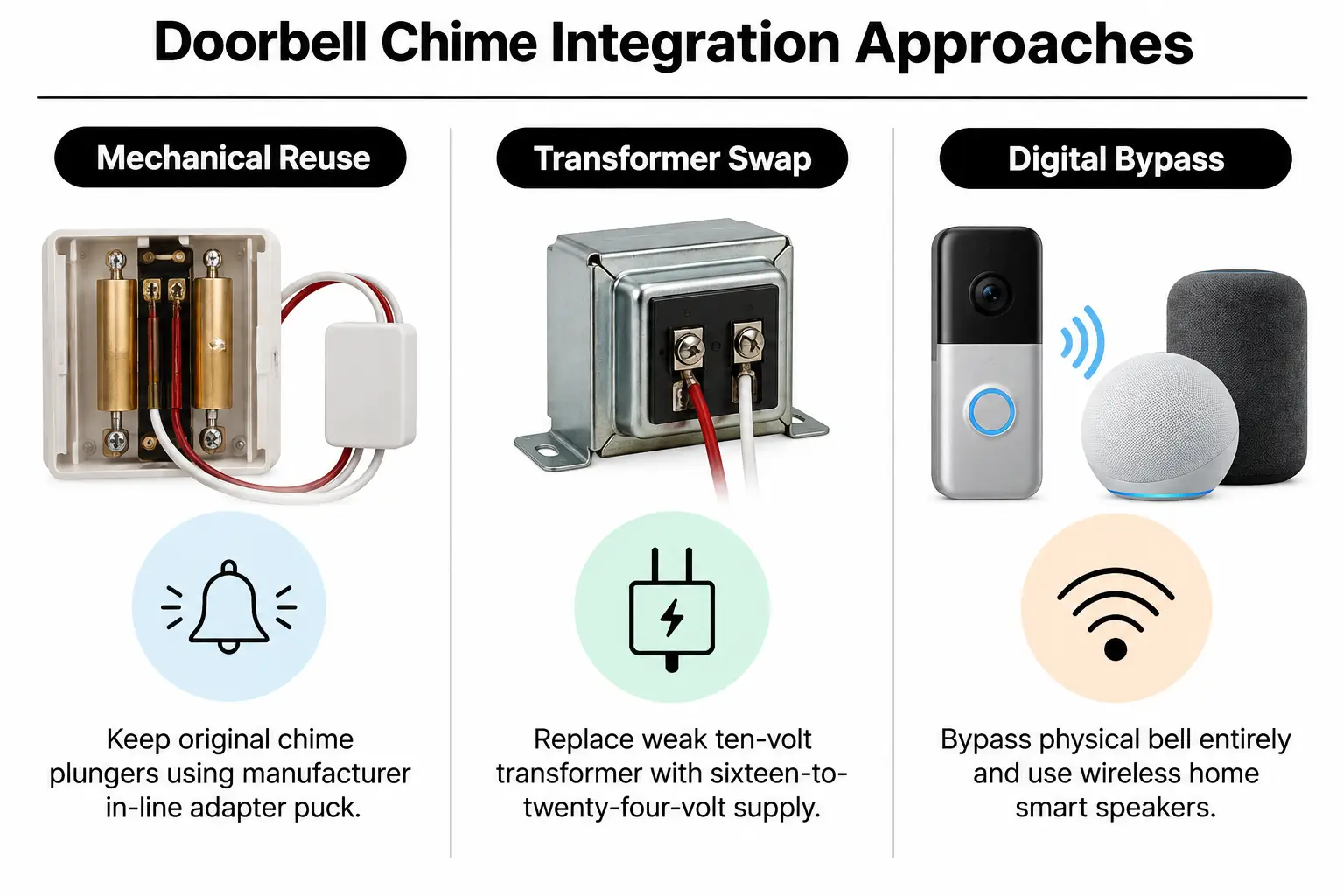
Option A: Hardwired Integration With Existing Mechanical Chime
Keep the existing copper wires and chime housing with this setup. A manufacturer-supplied power puck, a small power-control module, fits inside the housing. It supplies steady power to the outdoor camera and sends a burst to the mechanical strikers when needed.
Option B: Transformer Upgrade With Dedicated Digital Bypass
An old 10V bell installed by the builder needs a transformer replacement. Adding an adjustable digital bypass adapter lets you keep the original sound while supplying enough power to the new device.
Option C: Full Chime Bypass With Wireless Smart Speakers
Broken chime wires inside the wall may mean bypassing the indoor chime altogether. A direct plug-in transformer powers the smart doorbell instead. Voice assistants or dedicated plug-in chimes then sound the alerts around the house.
| Option | Best for | Watch out for |
|---|---|---|
| Existing mechanical chime | Keeping original fixtures without buying extra speakers. | Needs at least 16V 10VA and room for the puck inside the chime box. |
| Transformer upgrade + old chime | Getting reliable operation in homes with underpowered 10V systems. | Means locating a hidden transformer and working near 120V household wiring. |
| Chime bypass + smart chimes | Broken in-wall wires or digital chimes that sound poor. | Depends entirely on home Wi-Fi and separate accessories plugged into outlets. |
Chime Connectors, Puck Adapters, and Electrical Details
Don't leave the small module included with your smart doorbell in the box. Called a chime connector, power kit or chime puck, it controls the flow of electricity and isn't optional.
Why the In-Line Power Kit Matters
This module connects between the "TRANS" and "FRONT" terminals on the chime base. Without it, the camera draws power through the solenoid coil, the electromagnet that moves the striker. That creates two problems:
- Constant coil buzzing: A small, steady current keeps the plunger magnet energized, making the indoor chime hum loudly.
- Random device resets: Pressing the button briefly shorts the circuit to ring the bell. That cuts the camera's voltage and reboots the video feed just as the alert starts.
Managing Wire Gauge and Long Distance Runs
Older homes often have thin 20 AWG or 22 AWG bell wire; AWG describes wire thickness. Long runs from the garage breaker to the front door lose voltage through resistance. The electrical code standards for Class 2 low-voltage circuits explain why transformer sizing matters across large buildings.
Homes in established neighborhoods may have old intercoms that need a different wiring route altogether. Our advice on replacing an old intercom with a video doorbell covers the issues with proprietary intercom boxes serving multiple stations.
Practical check: Chime plungers that only twitch or move slowly after installation mean the transformer is losing voltage under load. Replace it with a 16V 30VA unit immediately.
Project Phases, Installation Timing, and Cost Factors
Doorbell work doesn't need to become an open-ended project. The condition of the circuit and access to the transformer determine much of the time and cost. For the wider exterior plan, read how continuous porch monitoring can help prevent package theft in Sterling.
| Phase | What happens | Who handles it | Typical timing |
|---|---|---|---|
| Phase 1: Voltage testing | Measure circuit voltage and check chime mechanics. Test the Wi-Fi signal. | Homeowner or technician | 15 to 30 minutes |
| Phase 2: Transformer upgrade | Turn off the breaker and replace the transformer with a 16V-24V high-output unit. | Licensed electrical technician | 45 to 60 minutes |
| Phase 3: Chime module wiring | Fit the adapter puck inside the chime box and connect the Trans and Front wire harness. | Installer or homeowner | 20 to 30 minutes |
| Phase 4: Outdoor mounting & app setup | Secure the camera bracket and attach the copper leads. Set the chime options in the app. | Installer or homeowner | 30 to 45 minutes |
Costs stay low if the existing transformer delivers at least 16V. Expect a higher, moderate cost if a technician must reach into finished ceilings to find an unmarked transformer. Running new 18/2 solid copper wire through exterior masonry also adds work.
Answers to Common Doorbell Chime Compatibility Questions
Will my indoor chime still ring if my internet connection goes down?
Yes, a hardwired video doorbell connected with a chime power kit will still ring your mechanical bell. Its striker runs on a closed electrical circuit, separate from Wi-Fi. Mobile notifications won't arrive during the internet outage, but the bell in your hallway will work normally when someone presses the button.
Can I use a battery-powered video doorbell with an existing chime?
Many battery-powered models support hardwired trickle charging and can trigger an existing chime, but results vary. Some use the outdoor wires only to charge their batteries. They don't close the circuit that moves the striker. Before mounting yours, check the settings for "mechanical chime bypass" or direct chime activation.
Why does my existing mechanical chime buzz constantly after installation?
Constant buzzing means a small alternating current keeps flowing through the chime's electromagnetic coils. A missing connector puck or a connection to the wrong screw terminals causes this. Fitting the bypass adapter across the transformer and front bell terminals stops that current leak immediately.
What should I do if my home has two chimes for front and back doors?
Two chime boxes, one for each door, need a power plan that accounts for both. Fit a dedicated connector at each bell location or ensure the transformer is rated for at least 24V 40VA. It must power both electromagnetic strikers and multiple cameras at once without losing voltage.
Do I need to hire an electrician to change the doorbell transformer?
Doorbell transformers connect directly to 120-volt household electricity on their input side. Replacing one means opening the electrical junction box and handling line-voltage connections. Homeowners without electrical training should hire a licensed professional to follow local building codes and safety rules.
Plan Your Smart Doorbell Installation in Sterling
At NovaProHome, we handle the electrical layout from the breaker box to the front door. We're an engineer-founded installer serving Sterling, Virginia. Getting your existing chime working with a video doorbell shouldn't take repeated attempts and electrical guesswork.
Our team brings over five years of hands-on electrical experience and ten years of operations leadership to each home project. We carry two million dollars in insurance coverage, with verified certifications as a Google Nest Pro and Ring Authorized Partner.
We handle dedicated transformer upgrades and full connected security installations, making sure indoor chimes ring clearly and cameras keep their power. For a free assessment and a fixed written quote for your setup, contact our local team.
Ready to engineer your smart home?
Start with a free 20-minute discovery call. No pressure, no sales script — just a plan.